Work Items @ OSB DevOps
OSB adapted Azure DevOps Agile Template and customized it to our methodology. A new level was introduced, called "Initiative", which groups epics by business initiatives. More details of each type of work item are available below.
Following diagram shows the hierarchy of Azure DevOps work items that are used to define backlog:
%%{init: {'flowchart' : {'curve' : 'linear'}}}%%

flowchart LR
    a(Initiative) --- b(Epic)
    a --- c(Epic)
    b --- d(Feature)
    b --- e(Feature)
    d --- f(User Story)
    d --- g(User Story)
    f --- h(Task)
    f --- i(Bug)
    click a href "#initiative"
    click b href "#epic"
    click c href "#epic"
    click d href "#feature"
    click e href "#feature"
    click f href "#user-story"
    click g href "#user-story"
    click h href "#task"
    click i href "#bug"
    style a fill:#000000,stroke:#000000,color:#FFFFFF
    style b fill:#FFA500,stroke:#FFA500,color:#FFFFFF
    style c fill:#FFA500,stroke:#FFA500,color:#FFFFFF
    style d fill:#800080,stroke:#800080,color:#FFFFFF
    style e fill:#800080,stroke:#800080,color:#FFFFFF
    style f fill:#0000FF,stroke:#0000FF,color:#FFFFFF
    style g fill:#0000FF,stroke:#0000FF,color:#FFFFFF
    style h fill:#FFFF00,stroke:#FFFF00
    style i fill:#FF0000,stroke:#FF0000,color:#FFFFFF
Members of a Team (client project or internal OSB initiative) can see all backlog items of that particular Team. An individual can belong to several Teams and therefore have access to different backlogs.
Not all of the work items described below exist to a given team. This will be added case by case depending on the scope and needs of that team.
Initiative
The initiative is the top parent work item type. This can be seen as the business initiative to be accomplished or a project itself. Under it we have the epics.
Epic
Epic can be seen as the body of work for the features, stories and tasks. This work item aggregates all the linked worked into functional or technical areas. It is up to the project team to define which areas to create if any.
Feature
Feature represents a new characteristic or capability to be implemented/developed. Features usually are linked to a business value and should have a clear set of acceptance criteria.
Typically, the owner of the features are the product owner, the business analysts or the architects. They are in charge of defining the scope of the feature as well as accepting it after successful completion.
User Story
User Story is one of the most granular work items. It represents the value the user will receive with the work from the tasks underneath. It is usually linked to one or several requirements of the project.
The user stories should be written from the user perspective. Typically, the User Stories should not last more than a couple of days to be completed.
Task
Task is the smallest work item and corresponds to a couple of hours of work and should be done by a single team member. A task is usually associated with a User Story, but it can also be linked with the "Bug" work item in case the work is related to fixing an issue.
Bug
The Bug work item represents a defect of a previously developed work. There are several sources for the Bugs: automatic tests, OSB testing team or the customer testing team. In either case, this must be identified in the DevOps platform and the associated work recorded as well. Once the Bug is being fixed, a correspondent Task must be created to track its fixing.
Work Items Lifecycle
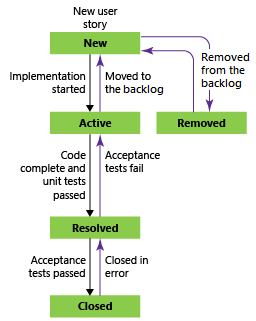
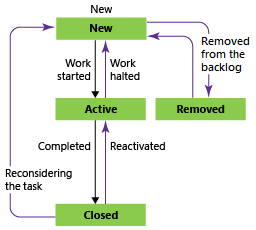
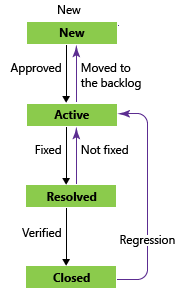
The official Azure DevOps documentation explains really well the workflow for the states for the User Story, Bug and Task. Features also have a similar lifecycle as the User Stories.
| User Stories | Task | Bug |
|---|---|---|
 |
 |
 |
User Stories
- The product owner creates a user story in the "New" state with the default reason, "New user story"
- The team updates the status to Active when they decide to complete the work during the sprint
- A user story is moved to Resolved when the team has completed all its associated tasks and unit tests for the story pass
- A user story is moved to the Closed state when the product owner agrees that the story has been implemented according to the Acceptance Criteria and acceptance tests pass.
Task
- The team member creates the task in the "New" state
- The team member updates the status to Active when the work is started
- A Task is moved to closed when the work is finished and all unit tests have passed.
Bug
- The bug can be created by automatic tests, team member or an external tester. Bug is created with the status "New"
- The team member updates the status to Active when work is started
- When work is completed, team member can move the bug to "Resolved" waiting for a verification
- The person who opened the issue is in charge of closing the Bug once it verified that issue is fixed